
Google Stitch is genuinely impressive. You type a prompt, and out comes a clean, modern UI: real layout, real typography, real spacing. Then you try to get that design into WordPress so you can actually publish it and edit it later, and the whole thing falls apart.
Because a beautiful screenshot is not a page. And Stitch’s HTML export is not an Elementor page. The gap between “AI made me a gorgeous design” and “I have an editable Elementor page my client can update” is where most people lose an afternoon, chaining together Gemini and Claude and JSON files that refuse to import.
This post walks through both routes: the free manual workflow (Stitch to Gemini to Claude to Elementor JSON), why it’s clunky and breaks so often, and the deterministic one-step alternative that outputs native, editable Elementor widgets instead of frozen HTML or an 80%-accurate JSON guess.
What is Google Stitch?
Google Stitch is an AI design tool from Google Labs that turns text prompts (and rough sketches) into UI designs. You describe what you want, “a SaaS pricing section with three tiers, a dark hero, a testimonial row,” and it generates a polished interface you can iterate on in the browser.
Crucially, Stitch lets you export what it makes. You can copy the design into Figma, or export the underlying HTML and CSS. That HTML export is the important part for WordPress users, because it’s the raw material every “Stitch to Elementor” workflow starts from. Stitch designs the page; it does not build your WordPress site. Getting from one to the other is entirely on you.
The Manual Method: Stitch → Gemini → Claude → Elementor JSON
If you search around for how to move a Stitch design into Elementor, you’ll land on some version of this pipeline. It’s clever, it’s free, and it works often enough that people keep recommending it. Here’s the honest version of what it involves:
- Export from Stitch. Grab the HTML/CSS output for your design.
- Refine with Gemini. Paste the markup into Gemini to clean it up, consolidate styles, and describe the structure in a way another model can reason about.
- Ask Claude for Elementor JSON. Prompt Claude (or another LLM) to translate that structure into an Elementor template JSON file, the format Elementor uses when you export and import templates.
- Import into Elementor. Go to Templates → Saved Templates → Import, upload the JSON, and hope it renders.
When it works, it feels like magic. The problem is how often it doesn’t, and how much of “the design” survives the trip.
Why the JSON hack is painful
An Elementor template JSON is a deeply nested, strictly-typed data structure. Every widget has required keys, specific setting names, element IDs, and a schema that Elementor validates on import. An LLM generating that JSON from scratch is predicting valid structure, not guaranteeing it. That’s where it breaks down:
- “Sorry, the content area was not found. The source does not support import.” This is the classic failure. It usually means the JSON is missing the wrapper fields Elementor expects (like the correct
type,version, orcontentarray shape), or the file was saved as the wrong template type. The design was fine; the container was malformed. - Silent partial imports. The template imports but half the widgets are empty, mislabeled, or stacked in the wrong order because the model guessed at settings keys that don’t exist.
- The “70–80%” ceiling. Even on a good run, you land at roughly 70–80% of the original design. Fonts default to the theme, custom spacing collapses, and the hover states and CSS animations from the Stitch export simply vanish, because the model flattened them out or never encoded them.
- Non-deterministic output. Run the same prompt twice and you get two different JSON files. Debugging is guesswork because there’s no stable thing to debug.
So you end up doing the last mile by hand anyway: rebuilding the hero, re-adding animations, fixing the typography, nudging padding on every section. The AI got you a starting point, not a finished, editable page.
The Native Conversion Method: AI to Elementor
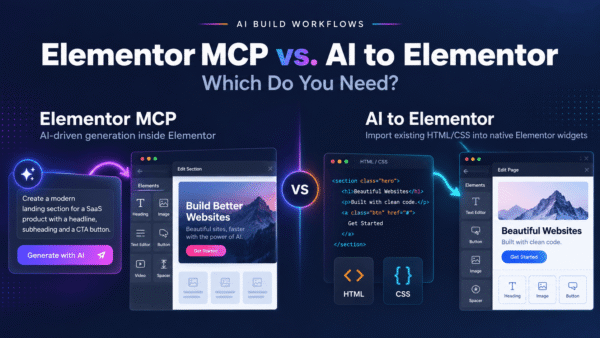
AI to Elementor takes a different approach. Instead of asking a language model to imagine valid Elementor JSON, it’s a WordPress plugin that parses your HTML and CSS deterministically and maps each element to a proper, native Elementor widget. Same input (your Stitch HTML export), but a real parser instead of a probabilistic guess.
The output isn’t a frozen HTML block dropped into a single widget, and it isn’t an 80%-accurate JSON approximation. It’s actual Elementor widgets, headings, buttons, images, columns, containers, that you can click, drag, and edit like anything you built by hand in the editor.
Step by step
- Design in Google Stitch. Prompt your page or section until you like it.
- Export the HTML/CSS from Stitch. No cleanup pass required, no Gemini middle step.
- Paste it into AI to Elementor. The plugin runs inside your WordPress admin, so there’s no round-trip to another AI tool.
- Convert. The parser reads the markup and styles and builds the corresponding native Elementor widgets, preserving fonts, colors, spacing, CSS animations, and hover states from the source.
- Edit in Elementor. Open the page and everything is a real widget. Change copy, swap images, adjust padding, restyle, and publish.
Because parsing is deterministic, the same input produces the same output every time. There’s no “import failed” lottery and no re-running a prompt hoping the next JSON is cleaner. It also works with Elementor Free; you don’t need Elementor Pro to get native widgets out the other side.
Manual JSON Hack vs. Native Conversion
| Manual (Stitch → Gemini → Claude JSON) | Native (AI to Elementor) | |
|---|---|---|
| Steps | 4+ tools, multiple copy-paste hops | Export, paste, convert |
| Output type | Guessed template JSON | Native, editable Elementor widgets |
| Accuracy | ~70–80%, varies per run | Deterministic, consistent |
| Import errors | Frequent (“source does not support import”) | None — builds directly in the editor |
| Fonts, colors, spacing | Often reset to theme defaults | Preserved from source |
| Animations & hover states | Usually lost | Preserved |
| Editability | Fix-it-by-hand after import | Fully editable widgets immediately |
| Elementor Free | N/A | Supported |
| Cost | Free + your time debugging | $47–297/year |
What Converts Well, and What Needs Prep
Being honest about the edges matters more than overselling. Here’s where native conversion shines and where a little preparation pays off.
Converts cleanly
- Standard layout structures: heroes, feature grids, pricing tables, testimonial rows, CTA sections, footers.
- Typography: font families, sizes, weights, and line spacing defined in the CSS.
- Colors and backgrounds, including gradients.
- Spacing: margins and padding at the section, column, and element level.
- CSS animations and hover states carried in the export.
- Buttons, images, and links mapped to their proper Elementor widget equivalents.
Needs a little prep
- Heavy custom JavaScript interactions. Elementor is a visual builder; complex JS-driven behavior may need to be re-implemented with Elementor’s own motion/interaction features or a custom code widget.
- External assets. Images referenced by remote URLs should be brought into your Media Library so they don’t break later.
- Extremely custom markup. Very unusual, deeply nested structures convert better when the HTML is reasonably clean, exactly what Stitch’s export tends to give you.
- Icon fonts and third-party embeds. Confirm the icon set or embed is available in your WordPress environment after conversion.
For a deeper walkthrough of the conversion process itself, see our complete guide to converting HTML to Elementor. If you want your AI tool to output cleaner, more convertible markup in the first place, our AI prompting guidelines cover how to structure requests so the export maps neatly to native widgets.
Frequently Asked Questions
How do I export a design from Google Stitch?
In Stitch, open the design you generated and use the export option to copy or download the HTML/CSS (Stitch also supports pasting into Figma). The HTML export is what you feed into any Stitch-to-Elementor workflow, including AI to Elementor. You don’t need to clean it up first when using native conversion.
Does the Gemini + Claude “generate Elementor JSON” method actually work?
Sometimes. It’s a legitimate free approach, but it’s non-deterministic: the model predicts Elementor’s template JSON structure rather than guaranteeing it. On a good run you land around 70–80% of the original design, with fonts, spacing, and animations frequently lost. On a bad run the JSON won’t import at all. AI to Elementor removes the guesswork by parsing the HTML deterministically.
Why do my Elementor JSON imports fail with “the source does not support import”?
That error almost always means the JSON is structurally invalid for Elementor’s importer, usually a missing or malformed wrapper (wrong type, version, or content shape) or the file was saved as the wrong template type. AI-generated JSON hits this a lot because the model guesses at those required fields. Native conversion sidesteps it entirely by building widgets in the editor instead of importing a file.
Does AI to Elementor work with Elementor Free?
Yes. You get native, editable Elementor widgets on the free version of Elementor, no Pro subscription required. Pro features you already have will still work, but they aren’t needed for conversion.
Are CSS animations and hover states preserved?
Yes. This is a key difference from the manual JSON route, which typically flattens or drops them. AI to Elementor preserves CSS animations and hover states from the source markup, so the converted page behaves like the original design, not a static snapshot of it.
Are the converted elements actually editable, or just frozen HTML?
They’re real, native Elementor widgets, headings, buttons, images, columns, and containers you can select, drag, restyle, and update in the Elementor editor. It is not a single frozen HTML block, and it is not an approximate JSON import you have to repair.
How much does AI to Elementor cost?
Plans run from $47 to $297 per year depending on usage and site count. Compared with the free manual method, you’re paying to skip the multi-tool chain, the failed imports, and the by-hand rebuild of everything the JSON hack loses.
Turn Your Stitch Designs Into Real WordPress Pages
Google Stitch is a great way to design fast. The bottleneck was never the design, it was the brittle handoff into WordPress. Instead of chaining Gemini and Claude to produce JSON that lands at 80% and sometimes won’t import, convert your Stitch HTML into native, editable Elementor widgets in one deterministic step, fonts, colors, spacing, animations, and hover states intact.
Try AI to Elementor and turn your next Stitch design into an editable page your team can actually maintain.