You vibe-coded a site in Replit or Bolt, ran it through WPConvert.ai or VibeToWP, and had a working WordPress theme in minutes. It felt like a win — until the client asked to change the hero headline, and you opened the “theme” to find exactly what you started with: code. No visual editor, no drag-and-drop, no way to hand it off. Every future tweak is a developer ticket.
WPConvert.ai and VibeToWP do a real job well — they wrap your generated site in a WordPress theme so it runs on WordPress. But a theme is still static code, and the moment you need to edit the design visually, that’s the wall you hit. AI to Elementor takes a different route with the same source: it converts your HTML into native, editable Elementor widgets, so the page stays something you (or a client) can change without touching code. This is an honest comparison of when each one is right.
What WPConvert.ai and VibeToWP do
Credit where it’s due. Both tools solve the “my vibe-coded site isn’t on WordPress” problem directly: you point them at a generated site — from Replit, Bolt, Lovable, v0, or similar — and they package it as an installable WordPress theme. You get WordPress hosting, the WordPress admin, and a site that boots up fast, without rebuilding anything by hand.
For a certain job, that’s exactly right. If you want your generated code running on WordPress essentially as-is — a portfolio, a landing page, a brochure site you’ll rarely touch — a theme wrapper is a clean, fast path. The honest catch is in the word “theme”: what you receive is PHP, HTML, and CSS files. It runs on WordPress, but it isn’t built in a way WordPress users can visually edit.
The catch: a generated theme is still code
This is the whole wedge, so it’s worth being precise. A WordPress theme is code that renders your pages. A page builder like Elementor stores pages as editable widgets you manipulate in a visual canvas. Those are different things, and the difference decides who can maintain the site:
- You can’t edit a theme visually. Changing a headline, color, or section order means editing template files or dropping into the code — not clicking and typing in a canvas.
- Clients are locked out. Hand a coded theme to a non-technical client and every edit routes back to you. Hand them native Elementor widgets and they can manage the site themselves.
- Iteration is slow. Even for a developer, code edits are slower than dragging a widget and retyping copy — and slower to preview safely.
None of this makes theme output wrong. It makes it a delivery format — great when the site is finished and static, frustrating when the design still needs to change.
What AI to Elementor does differently
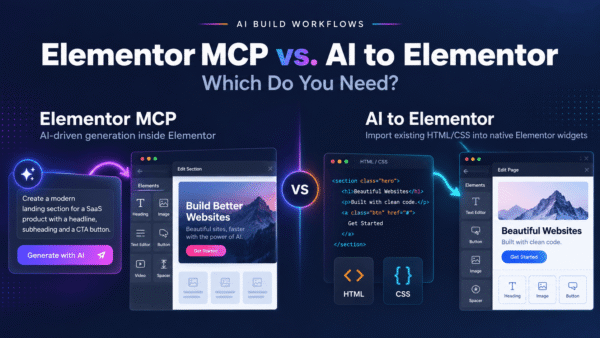
AI to Elementor is a WordPress plugin with one focused job: it takes the same HTML and CSS your vibe-coding tool produced and converts it into native, editable Elementor widgets. Headings become Heading widgets, buttons become Button widgets, and sections become Containers you can rearrange. It runs on a deterministic, server-side engine, so the same input produces the same widgets every time — no import-failed lottery.
Because it reads the actual CSS instead of freezing the page into template code, it preserves fonts, colors, spacing, CSS animations, and hover states at roughly 95.5% pixel fidelity. It works with Elementor Free, includes one free conversion to test your own page, and is priced annually: $47/yr Solo (30/month), $79/yr Pro (100/month), and $297/yr Agency (unlimited). The output isn’t a theme you install and freeze — it’s a page you keep editing.
Quick verdict: which one should you use?
Choose WPConvert.ai or VibeToWP if: you want your generated site running on WordPress as a theme, the design is essentially finished, and neither you nor your client needs to edit it visually afterward. A coded theme is a fine delivery format for a static, hands-off site.
Choose AI to Elementor if: the page needs ongoing visual editing, you’re handing it to a client who can’t touch code, or you simply want native Elementor widgets instead of template files. In short, switch the moment “I’ll need to edit this again” is true.
Feature comparison
| Feature | WPConvert.ai / VibeToWP | AI to Elementor |
|---|---|---|
| Output format | A WordPress theme (code files) | Native Elementor widgets |
| Visually editable | No — edit the code or templates | Yes — click, type, drag in Elementor |
| Client can maintain it | Not without a developer | Yes — no code required |
| Source | Vibe-coded / Replit / Bolt sites | Any HTML/CSS, including AI-generated |
| Animations & hover states | Preserved as code, not editable visually | Preserved as CSS in editable widgets |
| Predictability & fidelity | Theme mirrors the source code | Deterministic; ~95.5% pixel fidelity |
| Elementor Free support | N/A — not an Elementor tool | Yes |
| Free trial | Varies | One free conversion |
| Pricing | Varies (paid) | $47/yr Solo (30/mo), $79/yr Pro (100/mo), $297/yr Agency (unlimited) |
When a generated theme is the better choice
It would be dishonest to pretend theme output never wins. If your job is to get a finished, generated site onto WordPress and it genuinely won’t need visual editing, a theme wrapper from WPConvert.ai or VibeToWP is a clean, fast path. Developer-owned sites where every change already runs through code, one-off landing pages, and static brochure sites are all fair game — you keep your exact code, and you skip the page builder entirely. AI to Elementor isn’t trying to talk you out of that.
When AI to Elementor is the better choice
For most sites people actually hand off or keep iterating on, editable output is the point:
- Ongoing visual editing. The design will change — copy, colors, section order — and you want to do it in a canvas, not a code editor.
- Client handoff. A non-technical client can maintain native Elementor widgets themselves, which a coded theme makes impossible.
- Native widgets, not templates. You get real Heading, Text, Button, Image, and Container widgets with full settings — the same thing you’d build by hand, minus the hours.
- Deterministic, faithful output. The server-side engine returns the same widgets for the same input at ~95.5% fidelity, with animations and hover states intact.
- Elementor Free and annual pricing. One free conversion to try, a flat annual plan, and no Pro license required.
Switching from a theme workflow
Moving over is simple because you’re changing the output format, not the source. Instead of feeding your vibe-coded site into a theme generator, take the same HTML and CSS your tool already produced, paste it into AI to Elementor inside WordPress, and convert. You end up with editable widgets rather than template files — same design, different destination. If you’re weighing several routes, our roundup of the best AI to WordPress tools compares theme generators, converters, and site builders side by side, and our vibe coding to WordPress guide walks the full workflow from generated code to an editable Elementor page.
Frequently asked questions
Is AI to Elementor a good WPConvert.ai or VibeToWP alternative?
Yes, when you need the result to stay editable. WPConvert.ai and VibeToWP wrap a vibe-coded site in a WordPress theme, which is code you edit in templates rather than a visual canvas. AI to Elementor converts the same HTML and CSS into native, editable Elementor widgets, so you or a client can change copy, colors, and layout without touching code. If you never need visual editing, a theme is fine; if you do, the widget route wins.
What’s the difference between a WordPress theme and Elementor widgets?
A theme is code — PHP, HTML, and CSS files — that renders your pages, and editing it means editing those files. Elementor stores pages as widgets you manipulate visually in a canvas: click a heading to retype it, drag a section to reorder it. WPConvert.ai and VibeToWP produce the former; AI to Elementor produces the latter. The distinction decides whether a non-developer can maintain the site.
Can I visually edit a site converted by WPConvert.ai or VibeToWP?
Not in a page builder. Their output is a WordPress theme, so changes happen in the theme’s code or templates, not in a drag-and-drop editor. That’s fine for a finished, static site, but it locks out non-technical clients. If you want visual editing, convert the same HTML with AI to Elementor instead, and you get native Elementor widgets you edit by clicking and typing.
Does AI to Elementor keep my animations and hover states?
Yes. Because it reads the actual CSS instead of flattening or freezing the page, it preserves fonts, colors, spacing, CSS animations, and hover states in the resulting native widgets, at around 95.5% pixel fidelity. The difference from theme output is that here those styles live inside editable Elementor widgets, so you can adjust them visually rather than only in code.
Do I need Elementor Pro to use AI to Elementor?
No. AI to Elementor produces native, editable widgets on Elementor Free, with no Pro subscription required. Any Pro features you already have will still work, but they aren’t needed for conversion. That keeps the total cost low: an annual AI to Elementor plan plus the free version of Elementor, versus a coded theme you can’t edit visually.
How much does AI to Elementor cost compared to a theme generator?
AI to Elementor uses annual pricing: $47/year Solo (30 conversions/month), $79/year Pro (100/month), and $297/year Agency (unlimited), with one free conversion to try first. Theme generators like WPConvert.ai and VibeToWP are paid too; the more meaningful difference isn’t price but what you get — editable native widgets you can keep changing, versus a coded theme that’s fixed once it’s installed.
Get editable widgets, not a locked theme
A generated theme runs on WordPress but freezes your design in code. AI to Elementor converts the same vibe-coded HTML into native, fully editable Elementor widgets — animations and hover states preserved at ~95.5% fidelity, on Elementor Free — so the page stays yours (and your client’s) to change.
Convert your vibe-coded HTML to editable Elementor widgets →