
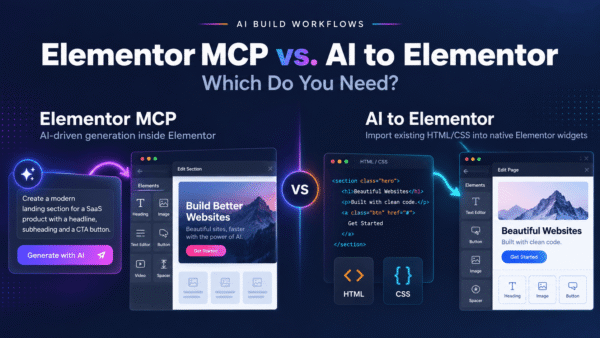
Elementor MCP is the Model Context Protocol server of Elementor: it lets Claude, Codex, Cursor or any MCP-compatible AI tool build editable Elementor pages from a prompt. Elementor MCP is free to connect and stable since Elementor 4.3.0 of September 22, 2026. AI to Elementor is a WordPress plugin that converts existing HTML into native Elementor widgets, first conversion free, plans from $47 a year. Elementor announced the MCP as a beta on September 15, 2026. Only site admins connect it, and Pro elements need an Elementor Pro plan (elementor.com/mcp/, the beta post and the wordpress.org changelog, checked October 31, 2026).
Disclosure: this page is published by AI to Elementor, one of the two tools compared. Every Elementor fact comes from the Elementor pages listed in the Sources, checked October 31, 2026.
| Elementor MCP | AI to Elementor | |
|---|---|---|
| What it does | Lets an AI tool build and edit Elementor content from a conversation | Converts an HTML page into native Elementor widgets, with HTML widgets for what it cannot map |
| Starts from | A prompt, with a brief, a link, a screenshot or a reference document attached | HTML you already have: a file, pasted code or a .zip with the page’s images and CSS |
| Cost | Free to connect; basic sections free to generate, Pro elements on a Pro plan; the AI tool billed by its own provider | 1 free conversion per website; Solo $47 a year (1 domain, 30 conversions a month), Pro $79 (3 domains, 100 a month), Agency $247 (unlimited domains, no monthly cap, up to 50 conversions a day per license key) |
| Needs | Elementor 4.3.0 or later; the current 4.3.5 needs WordPress 6.8 or later | Elementor Free or Pro with the Flexbox Container feature on; WordPress 6.8 or later (Elementor’s minimum; the plugin itself needs 5.8); PHP 7.4 |
| Who can use it | Connected by a site admin | An administrator or an editor on a standard site; the network administrator on a multisite; nobody on a site that sets DISALLOW_UNFILTERED_HTML |
| Output | Atomic elements, saved as a draft | A saved Elementor template of classic elements |
| Edits existing pages | Only pages built with atomic elements (V4) | No: it imports new templates |
| Does not convert or build | Edits of Widget (V3) layouts, announced as “soon” | Content a script builds at runtime, app logic, other builders’ markup, Figma files, whole sites in one pass |
| Elementor facts from elementor.com/mcp/ and the wordpress.org changelog, read October 31, 2026; AI to Elementor facts from its wordpress.org readme 1.3.51 and its pricing block, read the same day. | ||
The card’s first row holds the main difference: a prompt starts the MCP’s page, and existing HTML starts the converter’s.
Contents
- What is Elementor MCP?
- Is Elementor MCP free?
- Is Elementor MCP out of beta?
- How do you connect Elementor MCP?
- What can Elementor MCP build and edit?
- The difference between Elementor MCP and AI to Elementor
- Does Elementor MCP have an HTML import?
- Can Elementor MCP edit a converted page?
- Can you use both together?
- Do you need Elementor Pro?
- What AI to Elementor does not convert
- Which one should you use?
- Frequently asked questions
- Sources
What is Elementor MCP?
Elementor MCP is the server that connects an AI tool to an Elementor site, built on the Model Context Protocol. Elementor MCP exposes Elementor’s website-building capabilities through WordPress AI Abilities, according to Elementor’s beta announcement of September 15, 2026. The output of Elementor MCP is “native, editable Elementor structure” that lands on the site as a draft, by elementor.com/mcp/ (checked October 31, 2026). Elementor’s page lists Claude Code, Claude Desktop, Codex and Cursor, and the MCP connects to any MCP-compatible AI tool.
Elementor MCP works through the AI tool you connect. Elementor’s page puts the work on that tool: “The AI tool executes, the expertise directing it is yours” (elementor.com/mcp/, checked October 31, 2026). Cost comes next.
Is Elementor MCP free?
Yes, Elementor MCP is free to connect. Elementor’s FAQ (elementor.com/mcp/, checked October 31, 2026) sets three conditions.
- “Pricing follows Elementor’s existing plan structure”: basic sections and features are free to generate.
- Pro elements require a Pro plan. Elementor’s page names Forms, Popups, Loops, ecommerce widgets, Components, Dynamic Content, Headers and Footers among the tools that Pro plans expose to the MCP.
- “Your AI tool’s own costs are separate.” Elementor’s beta post says the same from the other side: the cost of using the MCP “depends on your chosen AI tool’s pricing”.
Elementor’s Pro plans are listed on elementor.com/pricing/, and the MCP page offers every plan with the line “Select your plan – MCP included” (checked October 31, 2026). The next question is whether Elementor MCP is still a beta.
Is Elementor MCP out of beta?
Yes, Elementor MCP is out of beta: it ships in the stable Elementor 4.3.0. Two Elementor pages give the dates.
- Elementor’s blog post “Elementor MCP: Connect AI Tools to WordPress (Beta)”, published September 15, 2026, opened the MCP “for beta testing”. The post asked testers to switch on beta versions under Version Control, update to the latest beta and activate the Atomic Editor.
- Elementor’s changelog on wordpress.org (checked October 31, 2026) lists “Introducing Elementor MCP” in version 4.3.0 of September 22, 2026. Versions 4.3.3 and 4.3.4 add MCP fixes, and the current version is 4.3.5 of October 13, 2026.
Elementor’s MCP page (checked October 31, 2026) presents the MCP as “Now available” and gives no beta step. Our own page of September 18, 2026 called it a beta; this version corrects that. The setup takes three steps in the WordPress dashboard.
How do you connect Elementor MCP?
To connect Elementor MCP, you need Elementor 4.3.0 or later, WordPress 6.8 or later (Elementor 4.3.5’s minimum) and a site admin account. The MCP has an on and off state: Elementor 4.3.3 “Improved access control when MCP is disabled” (wordpress.org changelog, checked October 31, 2026). Elementor’s page then describes three steps (elementor.com/mcp/, checked October 31, 2026).
- First, open Elementor > Elementor MCP in the WordPress dashboard and pick the AI tool you want to connect.
- Second, generate the setup prompt. Elementor creates the required application password in the background and puts it in the prompt.
- Finally, paste the prompt into your AI tool to complete the connection.
Elementor’s beta post (checked October 31, 2026) lists Claude Code, Claude Desktop, Codex, Cursor and “Other” as the choices, and a manual configuration option next to the prompt. The connection depends on WordPress Application Passwords: Elementor 4.3.4 fixed a setup that showed no error when Application Passwords were unavailable (wordpress.org changelog, checked October 31, 2026). The beta asked testers to activate the Atomic Editor, and the stable MCP page names no such step.
Our test, October 12, 2026: on a fresh install of Elementor 4.3.4 the MCP was off until the site’s admin switched it on. We have not tested the MCP with the Atomic Editor switched off.
Once connected, the MCP builds and edits a defined set of things.
What can Elementor MCP build and edit?
Elementor MCP builds full pages, theme parts and design systems, and edits existing atomic layouts, by elementor.com/mcp/ (checked October 31, 2026). Elementor’s page lists eight kinds of work.
- Full pages, described in the prompt.
- Projects from other tools: “A Figma design, Drive document, or WhatsApp message”, carried in by an AI tool that already has that connection.
- Theme parts: headers, footers, posts, 404 pages, with dynamic content.
- Edits and redesigns of existing pages; the page says it “currently supports atomic layouts”.
- Abilities from other plugins registered to the WordPress Abilities API, such as WooCommerce, Yoast and ACF.
- Custom widgets and snippets, and a customized WP Admin.
- Full design systems: colors, typography and sizes.
- Content and fixes at scale across hundreds of products or posts.
Three of the eight need Angie, Elementor’s free plugin on the WordPress repository. Elementor’s FAQ “Do I need Angie for everything?” (elementor.com/mcp/, checked October 31, 2026) answers that pages, sections and theme parts need only Elementor. Connections to other plugins, custom widgets and apps, WP Admin customization and bulk content actions need Angie. Elementor’s page states one more limit: the MCP “currently supports Atomic Elements”, and Skills are announced for later. The atomic limit is where AI to Elementor differs most.
What is the difference between Elementor MCP and AI to Elementor?
The main difference between Elementor MCP and AI to Elementor is the starting point. Elementor MCP lets an AI tool build a new page from a conversation, and AI to Elementor converts a page that already exists as HTML. The MCP’s result depends on the model and the prompt. The converter’s result depends on the HTML and on the site: the engine is a rule-based parser with no language model in the conversion.
| Elementor MCP | AI to Elementor | |
|---|---|---|
| Input | A prompt with context, or a Figma design through the AI tool | One HTML page per conversion, with that page’s images and CSS |
| Who decides the layout | The connected AI model | The HTML and CSS of the page |
| AI cost per page | The AI tool’s own plan or tokens | None from the Convert button: no model call in the conversion |
| Elementor elements | Atomic (V4) elements; Widget (V3) layouts announced | Classic elements, which Elementor 4 supports next to atomic elements |
| Elementor version | 4.3.0 or later | Elementor Free or Pro, Elementor 4 included; verified on Elementor 4.2 |
| Where the result lands | A draft on the site | A saved template in the Elementor library |
| Elementor facts from elementor.com/mcp/ and the wordpress.org changelog; AI to Elementor facts from its readme 1.3.51; read October 31, 2026. | ||
The table reads in one line: Elementor MCP spends the AI tool’s work to design a page, and AI to Elementor converts a page you already approved. Every HTML to Elementor converter by source, output and price is in our list of the best HTML to Elementor converters. The next question is HTML.
Does Elementor MCP have an HTML import?
No, Elementor MCP does not have an HTML import of its own: neither its page nor its beta post lists one (both checked October 31, 2026). Elementor’s page names the inputs as “a brief, a link, a screenshot, or a reference document” attached to a prompt. The beta post says the AI tool can carry “a whole file” as context into the page it builds, so an HTML file goes in as context. What lands in Elementor is then the model’s rebuild of that file. AI to Elementor reads the DOM and the CSS, writes a native widget for each element it can map and an HTML widget for the rest. The steps to convert HTML to Elementor with a converter are in our complete guide. A converted page raises the next question.
Can Elementor MCP edit a page converted with AI to Elementor?
No, Elementor MCP cannot edit a page converted with AI to Elementor today. Elementor’s FAQ limits edits of existing sites to those “built with atomic elements and layouts (V4)” (elementor.com/mcp/, checked October 31, 2026). Support for Widget (V3) layouts comes “soon”, with no date. AI to Elementor imports pages as classic elements, which Elementor 4 supports and which you edit in the Elementor editor as before (readme 1.3.51). The MCP builds new atomic pages on the same site, next to the converted ones. Our page of September 18, 2026 suggested editing a converted page through the MCP; that step waits for Elementor’s support of Widget (V3) layouts.
Can you use Elementor MCP and AI to Elementor together?
Yes, you can use Elementor MCP and AI to Elementor together on one site. Since plugin 1.3.50, AI to Elementor registers a WordPress ability, aitoel/convert-html, that an AI client connected to the site calls, for example Claude through Elementor’s MCP server. The AI tool passes a page’s HTML and gets back a saved Elementor template, the same template the Convert button creates (readme 1.3.51). The ability has four conditions.
- The ability needs WordPress 6.9 or later; the route through Elementor’s MCP server adds Elementor 4.3 or later with its MCP switched on.
- The ability uses the same conversion service, plan and allowance as the Convert button.
- The ability converts for a user who can edit posts and has the right to save unfiltered HTML: an administrator or an editor on a standard site.
- A filter in the readme switches it off.
Elementor’s FAQ says connections to other plugins need Angie (elementor.com/mcp/, checked October 31, 2026), and our readme names no Angie for this ability. Angie is free on the WordPress repository, so a site that installs it meets both. The AI tool writes the page’s HTML into its call, so that route spends the AI tool’s own tokens, unlike the Convert button. The listing on Elementor’s MCP server uses an extension point of Elementor’s own MCP package, which Elementor controls.
From our engineering notes, October 12, 2026: our ability is listed on Elementor’s MCP server through that extension point, tested on Elementor 4.3.4.
A page built in Claude and then converted is the case our Claude to Elementor guide walks through. Every AI tool’s route sits on our vibe coding to WordPress hub. The last condition is Elementor Pro.
Do you need Elementor Pro for either tool?
No, you do not need Elementor Pro for either tool’s basic work. Elementor MCP generates basic sections and features without a paid plan, and Elementor’s Pro elements come with the Pro plans (elementor.com/mcp/, checked October 31, 2026). AI to Elementor works with Elementor Free and Elementor Pro (readme 1.3.51), and Pro changes two results. A form with standard fields becomes Elementor Pro’s native Form widget, and you set where its submissions go. A header converted in header mode lands in the Theme Builder, with Pro’s Nav Menu widget for its navigation (our AI Guidelines and the engine’s code, read October 31, 2026). On Elementor Free, the form stays as an HTML widget that looks as it did. The converter has other limits, set out next.
What does AI to Elementor not convert?
AI to Elementor does not convert six kinds of content into native widgets, by our AI Guidelines, our readme and the engine’s code.
- Content a script builds in the browser at runtime, such as React or Vue sections and canvas.
- JavaScript behavior. The page’s scripts carry over as code in one HTML widget at the end of the template, and GSAP ScrollTrigger timelines do not bind to Elementor’s page.
- App logic and backends, which stay with the app.
- Markup from other builders: Divi, WPBakery, Beaver Builder, Bricks.
- Figma files: the converter reads HTML, not design files.
- Whole sites: one page per conversion.
Navigation outside a declared header or footer, tables, iframes other than YouTube or Vimeo, and inline SVG icons stay as HTML widgets that look as they did. The full mapping of elements to widgets for Elementor Free is in our AI Guidelines. With both sets of limits on the table, the choice comes down to where your page starts.
Which one should you use: Elementor MCP or AI to Elementor?
Elementor MCP or AI to Elementor depends on whether the page exists yet.
- The page does not exist yet: use Elementor MCP and let Claude, Codex or Cursor build it in Elementor as atomic elements.
- The page exists as HTML, from an AI tool or by hand: use AI to Elementor to convert it from its own HTML and CSS instead of a second design pass. Check the parts in the list of what it does not convert.
- Both happen on one site: convert the existing pages and build the new ones through the MCP, or let the AI client call the converter through the MCP.
The questions below cover the details people search for.
Frequently asked questions
Short answers on Elementor MCP and AI to Elementor, each from the pages named in the Sources.
Does Elementor MCP cost AI tokens?
Who can connect Elementor MCP?
Does Elementor MCP publish pages on its own?
Does Elementor MCP replace the Elementor editor?
Does AI to Elementor use an AI model to convert?
Is the first AI to Elementor conversion free?
Try AI to Elementor
Already built your page with Claude, Lovable, v0, Bolt, Replit or another AI website builder?
Don’t rebuild it from scratch.
Convert the existing HTML and CSS into an editable Elementor template, native widgets where the converter can map them, and continue working on the page inside WordPress.
Install AI to Elementor free — your first conversion requires no account or API key.
Install free on WordPress.org
1 conversion per site, no sign-up. Elementor required (free version is fine, with the Flexbox Container feature on).
Sources
- Elementor MCP: supported AI tools, “Now available”, the three setup steps and the application password, what it builds, “currently supports atomic layouts”, the Angie FAQ, Pro plans, “Select your plan – MCP included”, drafts, inputs, “The AI tool executes, the expertise directing it is yours”, the FAQ on cost, admins, editing existing sites and the editor, Atomic Elements now and Widget (V3) layouts “soon” · elementor.com/mcp/ · checked October 31, 2026
- The beta announcement of September 15, 2026: “open for beta testing”, WordPress AI Abilities, “a whole file” as context, the beta setup through Version Control and the Atomic Editor, the manual configuration option, the cost tied to the AI tool’s pricing · elementor.com/blog/elementor-mcp-beta/ · checked October 31, 2026
- Elementor 4.3.0 “Introducing Elementor MCP” (September 22, 2026), the MCP fixes in 4.3.3 and 4.3.4, version 4.3.5 with WordPress 6.8 or higher · wordpress.org/plugins/elementor/ (changelog) · checked October 31, 2026
- Elementor’s plans · elementor.com/pricing/ · checked October 31, 2026
- AI to Elementor: one free conversion per website, one page per conversion, classic elements in Elementor 4 (verified on Elementor 4.2), Elementor Free and Pro, the Flexbox Container feature, WordPress 5.8 and PHP 7.4, the administrator or editor right, the
aitoel/convert-htmlability of 1.3.50 with WordPress 6.9 and Elementor 4.3 · wordpress.org/plugins/aitoel-html-importer/ (readme 1.3.51) · checked October 31, 2026 - Plans and prices · aitoelementor.com/ (pricing block) · checked October 31, 2026
- Daily limit of 50 conversions per license key · aitoelementor.com/terms-and-conditions/ §8 · checked October 29, 2026
- What converts, what stays as an HTML widget, header mode and the Theme Builder · aitoelementor.com/ai-guidelines/ · checked October 29, 2026
- No language model in the conversion; scripts kept in one HTML widget at the end of the template; the native Pro Form and Nav Menu widgets on Elementor Pro · our engine’s mainline source code · read October 30 and 31, 2026
- The MCP off on a fresh install of Elementor 4.3.4 until the admin switches it on; the listing of our ability through an extension point of Elementor’s MCP package · our engineering notes of October 12, 2026 · read October 31, 2026