
You described a website to an AI tool, and thirty seconds later something beautiful appeared on your screen. Clean layout, real typography, hover effects, maybe even a scroll animation. This is vibe coding — the 2026 term for building sites by describing them to AI instead of hand-writing every line of markup. Tools like Lovable, Bolt, v0, Claude, Base44, Google Stitch, and Blink have made it genuinely fast and genuinely good.
And then you hit the wall every vibe coder hits: the output is HTML or React, but your client’s site runs on WordPress. Worse, your client needs to edit that page next month without calling you. Getting a vibe-coded design into WordPress as a real, editable site is the problem this page solves.
What is vibe coding?
Vibe coding is the practice of generating working front-end code by describing what you want in plain language, then iterating conversationally — “make the hero darker,” “add a pricing section,” “tighten the spacing.” The AI writes the HTML, CSS, and often the JavaScript. You steer by vibe rather than by syntax. The phrase went mainstream in 2025 and by 2026 it’s simply how a lot of landing pages, portfolios, and marketing sites get built first.
The strength is obvious: speed and design quality without a designer-developer handoff. The weakness is just as consistent — these tools output code artifacts, not content-managed websites. A React component or a standalone HTML file is not a WordPress page, and no amount of prompting inside the AI tool changes that.
The vibe coding tools
- v0 (Vercel) — Generates polished React/Tailwind components from prompts; the go-to for developers who live in the Vercel ecosystem.
- Bolt (StackBlitz) — Full-stack app and site generation that runs live in the browser, great for complete multi-page builds.
- Lovable — Prompt-to-app builder popular for MVPs and marketing sites with clean, opinionated design defaults.
- Claude — Produces high-quality standalone HTML/CSS artifacts and can iterate on design details with unusually good taste.
- ChatGPT — Generates HTML/CSS on demand and is the most common entry point for non-developers experimenting with AI design.
- Google Stitch — Google’s design-to-code tool that turns prompts and references into structured UI markup.
- Base44 — All-in-one AI app builder aimed at shipping full products from a description.
- Cursor — An AI code editor where developers “vibe” larger builds while keeping full control of the codebase.
Different engines, same finish line: they all hand you HTML or a framework component, and they all leave the WordPress step to you.
The WordPress problem
Here’s why the last mile is painful. Vibe-coded sites are HTML, CSS, and frequently React. Your clients — and most of the paying world — run WordPress, usually with Elementor as the page builder because that’s what lets a non-technical owner update copy, swap images, and change prices themselves.
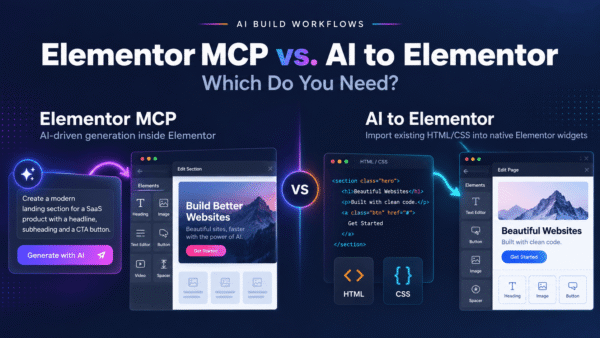
So you try the obvious thing: paste the AI’s HTML into Elementor’s HTML widget. It renders. It even looks right. But it’s a frozen block — a single opaque chunk of code sitting inside your page. Your client can’t click the headline and retype it. They can’t recolor a button in the Elementor panel. They can’t drag the pricing section above the testimonials. Every future edit routes back through you and a code editor. That’s not a WordPress site; that’s a screenshot with extra steps.
The other common route — exporting to some 70–80% JSON conversion — leaves you cleaning up broken spacing, missing animations, and mangled structure for hours. You didn’t vibe-code to spend the afternoon debugging JSON.
The bridge: AI to Elementor
AI to Elementor is a WordPress plugin that closes this gap. It takes the HTML output from any vibe coding tool and converts it into native, editable Elementor widgets — not a frozen block, not a lossy JSON approximation. It parses your HTML and CSS deterministically, mapping each element to the real Elementor widget it should be: headings become Heading widgets, buttons become Button widgets, sections become Sections and Containers you can actually rearrange.
Because the parsing is deterministic rather than a guess, the result is predictable. Your fonts, colors, CSS animations, and hover states are preserved. And because everything lands as genuine Elementor widgets, your client edits the page the normal way — clicking, typing, and dragging inside Elementor — with zero code. It works with Elementor Free, runs from $47–297/year depending on tier, and gives you one free conversion so you can test your own vibe-coded page before paying anything.
Tool-by-tool guides
Every tool has quirks in how it structures markup. These focused guides walk through the exact workflow for each:
- v0 → Elementor: exporting clean HTML from v0 and converting it. → Full v0 guide
- Bolt → Elementor: pulling a Bolt build into editable WordPress. → Full Bolt guide
- Lovable → Elementor: turning a Lovable project into native widgets. → Full Lovable guide
- ChatGPT → Elementor: the copy-HTML-to-editable-page workflow. → Full ChatGPT guide
Claude, Google Stitch, Base44, and Cursor all follow the same pattern: get the rendered HTML/CSS, run it through AI to Elementor, edit natively.
Frequently asked questions
What is vibe coding?
Vibe coding is building websites and apps by describing what you want to an AI tool in plain language and iterating conversationally, instead of writing the code by hand. Tools like v0, Bolt, Lovable, Claude, and ChatGPT generate the HTML, CSS, and JavaScript for you.
Can you use a vibe-coded site on WordPress?
Yes, but not by default. Vibe coding tools output HTML or React, which WordPress doesn’t natively treat as an editable page. To make a vibe-coded design work as a real, editable WordPress site, you need to convert its HTML into Elementor widgets — which is exactly what AI to Elementor does.
Why can’t I just paste the HTML into Elementor?
You can paste it into Elementor’s HTML widget, but the result is a frozen block: a single chunk of code your client can’t edit visually. They can’t retype headlines, recolor buttons, or rearrange sections without going back into the code. Native widgets solve this because each element becomes a real, editable Elementor component.
Does AI to Elementor work with all AI tools?
It works with any tool that produces HTML/CSS — including v0, Bolt, Lovable, Claude, ChatGPT, Google Stitch, Base44, and Cursor. Because it parses standard HTML and CSS deterministically, the source tool doesn’t matter; the markup does.
Does it work with Elementor Free?
Yes. AI to Elementor produces native Elementor widgets that work with Elementor Free — you don’t need Elementor Pro to get an editable converted page.
Are animations and hover effects preserved?
Yes. The conversion preserves fonts, colors, CSS animations, and hover states, so the converted Elementor page matches the design your AI tool produced rather than a stripped-down approximation.
Turn your vibe-coded site into an editable Elementor page
You already did the hard, creative part — you described a great site and an AI built it. Don’t lose that work to a frozen HTML block. Convert it into native, editable Elementor widgets your client can actually manage. Try one free conversion with AI to Elementor and see your vibe-coded page become a real WordPress site.